
Bump photos month by month that line up
Use last month's photo as the guide. Open it in LikeThis, and your outline from last month shows on your iPhone camera. Stand in the same spot, turn the same way, and fill the outline. Every month has the same spot, the same pose and the same height, so only the bump changes.
Last updated: 2026-10-22
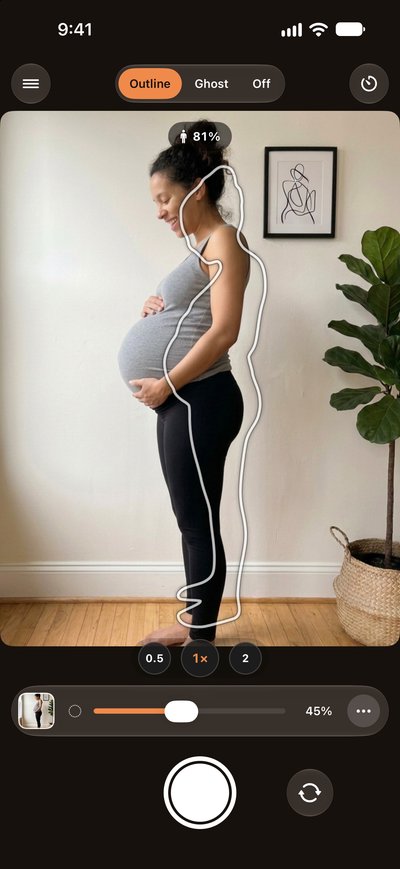
Why monthly bump photos rarely line up
The spot is the same, but the phone is not. A few steps closer, the phone a bit higher, a slight turn: the bump looks bigger or smaller for the wrong reason. To see the change month by month, three things must stay the same:
- The camera: the same place, the same height, the same zoom.
- You: the same spot on the floor, the same turn, the same pose.
- The room: the same wall, the same light, if you can.




The people in these example photos are AI-generated. They are illustrations, not LikeThis customers.
Step by step with LikeThis
- Take the first photo. Choose a plain wall with soft light, for example next to a window. Stand side-on. Hold the phone at belly height, at 1x.
- Next month, open last month's photo. Pick it in LikeThis. Your outline from last month is now on the camera.
- Put the phone in the same place. Same shelf, same height. Tips like "Step back" tell you if it moved.
- Then fill the outline. Stand on the same spot and turn the same way, until your back and your feet sit in the outline and the score is high.
- Take the shot and compare. LikeThis lines up the two months for you. Slide between them, or share both side by side.
Tips
- Mark the spot on the floor with a small piece of tape. Mark where the phone stands, too.
- Wear the same top, or the same color, every month.
- Take the photo at the same time of day, so the light is the same.
- Alone? Lean the phone on a shelf, set the timer and step into the outline. Auto-shutter takes the shot when you line up.
- Want to line up the room too? Switch to Ghost mode and use the slider.
Ideas for bump photos
The Ideas gallery in LikeThis has pregnancy photos to recreate, each with a one-line tip. Some examples:

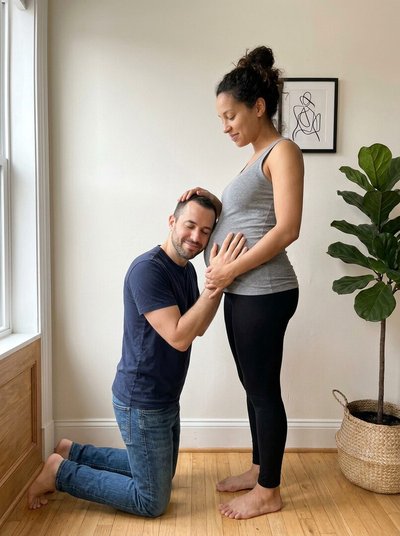

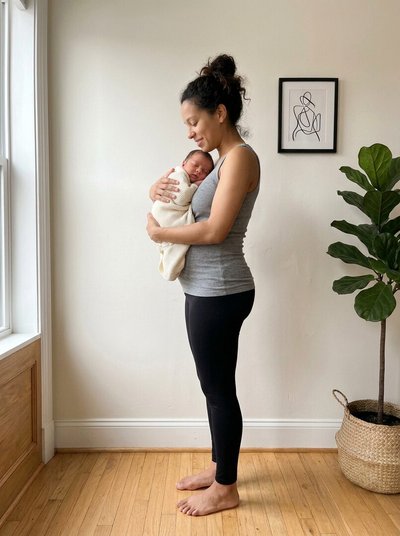
After the birth, open the last bump photo and stand in its outline with the baby. Then keep going, month by month.
Related
Questions people ask
How do I take bump photos in the same spot every month?
Use last month's photo as a guide on the camera. In LikeThis, your outline from last month shows on the live camera, with a match score. Put the phone in the same place, stand where you stood, and fill the outline. Ghost mode also shows the room, if you want to line it up exactly.
When should I start monthly bump photos?
Many people start between week 12 and week 16, when the bump starts to show. You can also start earlier and keep a photo for every month. What matters most is the same spot and the same pose every time.
Can I take bump photos alone?
Yes. Lean the phone on a shelf or use a small tripod, set the timer in LikeThis, and step into the outline. Auto-shutter takes the shot when you line up. Or flip to the front camera and check the outline while you pose.
Where do I find bump photo ideas?
LikeThis has an Ideas gallery with pregnancy photos to recreate, each with a one-line tip. You can also pick any photo you saved.
Does LikeThis use AI to change my photo?
LikeThis does not generate people or scenes. It draws an outline over the real camera so you can take a real photo. Afterward, it can align and crop the shot to match your reference.
Is LikeThis free?
Free to download. Explore the demo before choosing Pro; taking photos requires a purchase. The yearly plan has a 3-day trial for eligible users. Other available plans and local prices appear in the app before purchase.
Pick a photo. Step into the outline. Take the shot.
For iPhone and iPad. Free demo; photos require Pro.