 LikeThis
Recreate a Pinterest photo: he copies it, you are in it
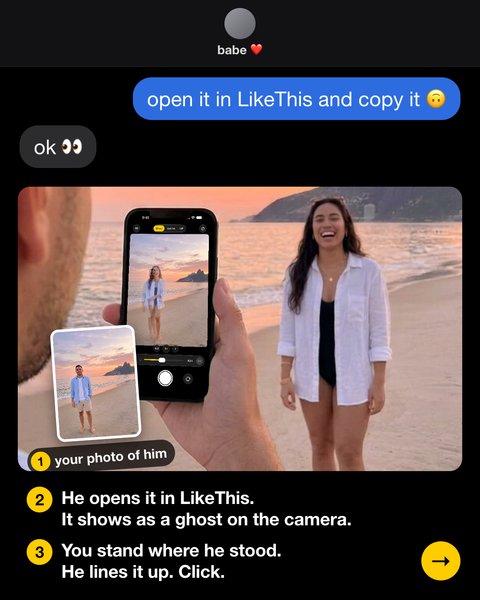
Look at the pin, then take his photo in the same spot with the same framing: you know what you want. He opens your photo of him in LikeThis, and it shows as a see-through ghost on his camera. You stand where he stood, do the pin pose, and he takes it. You can also use the pin itself as the ghost.
Last updated: 2026-10-20
"Babe, take one exactly like this"
You send him the pin. He says "got it". You get a panorama with you somewhere in it. The pin was never the problem: he cannot see the pin and the camera at the same time, and he does not know where the photographer stood.
The him-first way (works anywhere)
- Look at the pin: where the person stands, how much background, how high the camera is.
- Put him in that spot and take his photo like the pin. You are the one with the eye for it.
- He opens your photo of him in LikeThis. It is a ghost on his camera.
- You stand where he stood and do the pin pose. He lines up the ghost and shoots.
The pin-as-ghost way (same place only)
- In the Pinterest app, save the image to your photos. If you cannot, take a screenshot and crop it to the photo only.
- Open LikeThis on his phone and pick the image. The pin is now the ghost.
- He matches the background, you match the pose.
Pins that are easy to recreate
- One or two people with a clear background: a beach, a street, a wall.
- Photos taken with a phone, not with a long lens far away.
- Places you can get to: the café near you, the park, a landmark on your trip.
Pins that are hard to recreate
- Studio photos with special light. LikeThis matches the framing, angle, height and distance, not the light.
- Photos taken with a drone or from a place you cannot stand.
Related
Questions people ask
Can I use a Pinterest photo as a camera overlay on iPhone?
Yes. Save the pin to your iPhone (or take a screenshot), then open it in LikeThis: it shows as a see-through overlay on the live camera. It works best when you can stand where the pin's photographer stood. If the pin was shot elsewhere, take his photo in your spot first and use that as the ghost.
Does LikeThis connect to my Pinterest account?
No. LikeThis does not connect to Pinterest or Instagram. You save the image to your photo library first, then pick it in LikeThis.
Is LikeThis free?
LikeThis is free to download, and your first shot is free. To keep shooting, you need LikeThis Pro: $4.99 a week or $29.99 a year, both with a 3-day free trial, or a one-time lifetime purchase. These are US prices on 2026-10-20; the App Store shows the price in your currency.
Does LikeThis upload my photos?
No. The ghost, the crop and the before-and-after are made on the iPhone. LikeThis does not upload your photos, and you do not need an account. Read the Privacy Policy for the details.
Take his photo first. He takes care of the rest.
For iPhone and iPad with iOS 16 or later. Your first shot is free.