 LikeThis
Ways to get the photo you want, compared
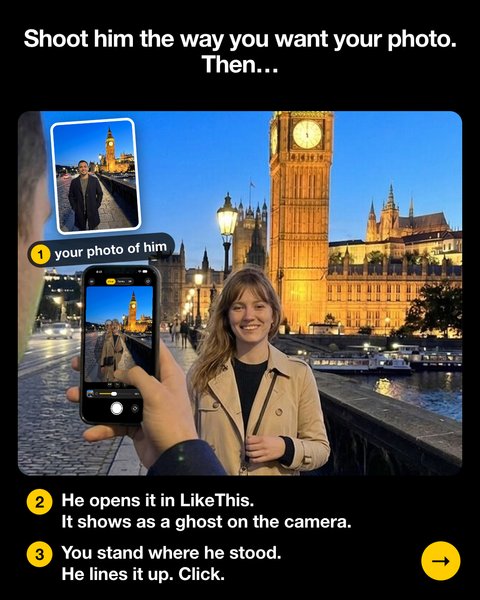
To copy a photo, the person holding the phone must see the reference and the live camera at the same time. LikeThis does this on one screen: you take his photo first, and it shows as a ghost on his camera. Explaining, a second phone, the grid, pose apps and AI each solve a different part of the problem, or a different problem.
Last updated: 2026-10-20
| Method | Uses your own reference photo | He sees reference and camera at once | Real photo | Cost |
|---|---|---|---|---|
| LikeThis (overlay camera) | Yes: your photo of him, or any photo | Yes, as a see-through ghost | Yes | First shot free, then LikeThis Pro |
| Explaining angles ("lower… no, lower") | No | No, he guesses | Yes | Free, plus one argument |
| Other overlay camera apps | Yes | Yes | Yes | Varies; check the App Store |
| Reference on a second phone | Yes | No, he looks back and forth | Yes | Free |
| Camera grid | No | No, it shows thirds only | Yes | Free |
| Pose-guide apps | Mostly stock poses | Some show a pose outline | Yes | Varies |
| AI photo generators | Sometimes as input | Not a camera | No, a generated image | Varies |
Comparison by method, checked on 2026-10-20. Other overlay camera apps include PastShot and Retakee; features and prices change, so check their App Store pages.
When LikeThis is the right tool
- Someone else holds the phone and needs to see the photo you want: you take his photo first, he copies it.
- You have a specific shot in mind: a landmark, a pin, last year's trip photo.
- You want a before-and-after that lines up.
When another tool is better
- You have no idea what photo you want: a pose-guide app gives you a library (LikeThis also has an Ideas library, smaller).
- You want to repair or colorize an old print: use a photo restoration app.
- You need studio light or RAW files: use a pro camera app.
Related
Questions people ask
What is the difference between a pose app and a photo overlay camera?
A pose app shows poses from its own library, often with tips. A photo overlay camera shows a photo you pick, over the live camera, so the person holding the phone copies that exact photo. LikeThis is an overlay camera: you take his photo first, and it becomes the ghost on his camera.
Is an AI photo the same as a recreated photo?
No. An AI generator makes a new image that did not happen. A recreated photo is a real photo, taken by a real camera, in a real place. LikeThis helps him take the real one.
Take his photo first. He takes care of the rest.
For iPhone and iPad with iOS 16 or later. Your first shot is free.